How to activate the daily HACCP report
Receive a PDF report with the HACCP data via email every day.
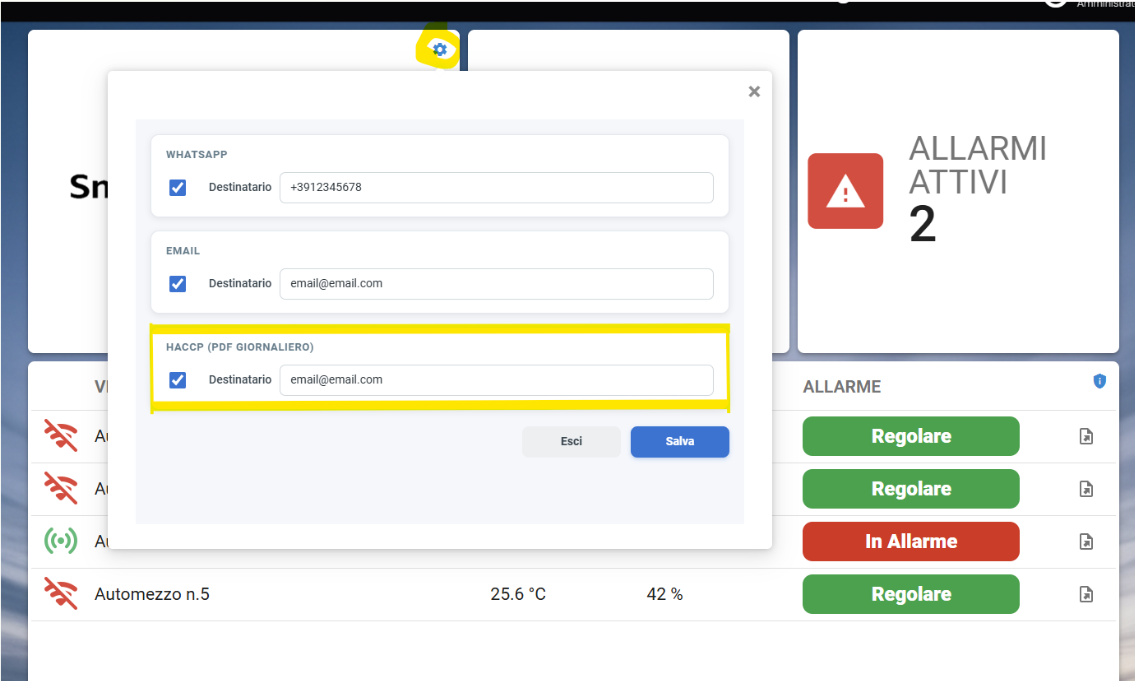
- From the dashboard, click on the gear icon at the top of the SmartCold Monitor box.
- The notifications configuration panel opens.
- In the 'HACCP (Daily PDF)' section, enable the 'Recipient' checkbox.
- Enter the email address where you want to receive the daily report.
- Click 'Save'. From now on you will receive a PDF report with temperature data every day.
Notes
The HACCP report is sent automatically every morning and contains the temperature data of the last 24 hours for each configured vehicle.
Troubleshooting
If the report doesn't arrive, verify your email address and check your spam folder. The report is generated only if the vehicle has recorded data in the previous day.
Related guides
- How to activate the daily HACCP report
Receive a PDF report with the HACCP data via email every day.
- How to export a report CSV
Download temperature data in CSV format for analysis or documentation.
- How the daily HACCP report works
The automatic HACCP report for cold chain documentation.
- Report HACCP does not arrive
The daily report HACCP is not delivered.