Report HACCP does not arrive
The daily report HACCP is not delivered.
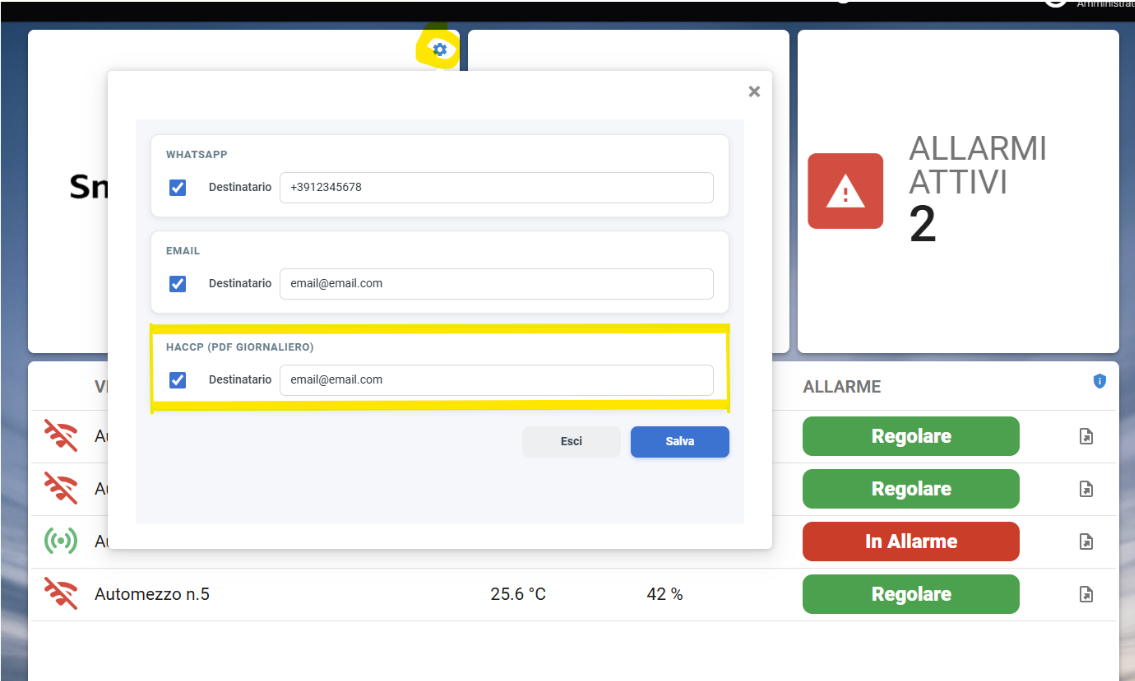
- Check that the HACCP report is enabled in the notification settings.
- Check that the email address HACCP is correct.
- Check in spam folder: automatic reports can be filtered.
- The report is generated only if the vehicle recorded data the previous day. If the vehicle was turned off, the report is not generated.
- Make sure your subscription is active.
Notes
Report HACCP is sent every morning and covers the previous day's data. If there is no data, the report is not generated.
Troubleshooting
If the report does not arrive for several consecutive days despite the vehicle being active, contact technical support.
Related guides
- How to activate the daily HACCP report
Receive a PDF report with the HACCP data via email every day.
- How to export a report CSV
Download temperature data in CSV format for analysis or documentation.
- How the daily HACCP report works
The automatic HACCP report for cold chain documentation.