How to activate notifications WhatsApp
Receive temperature alarms directly on WhatsApp.
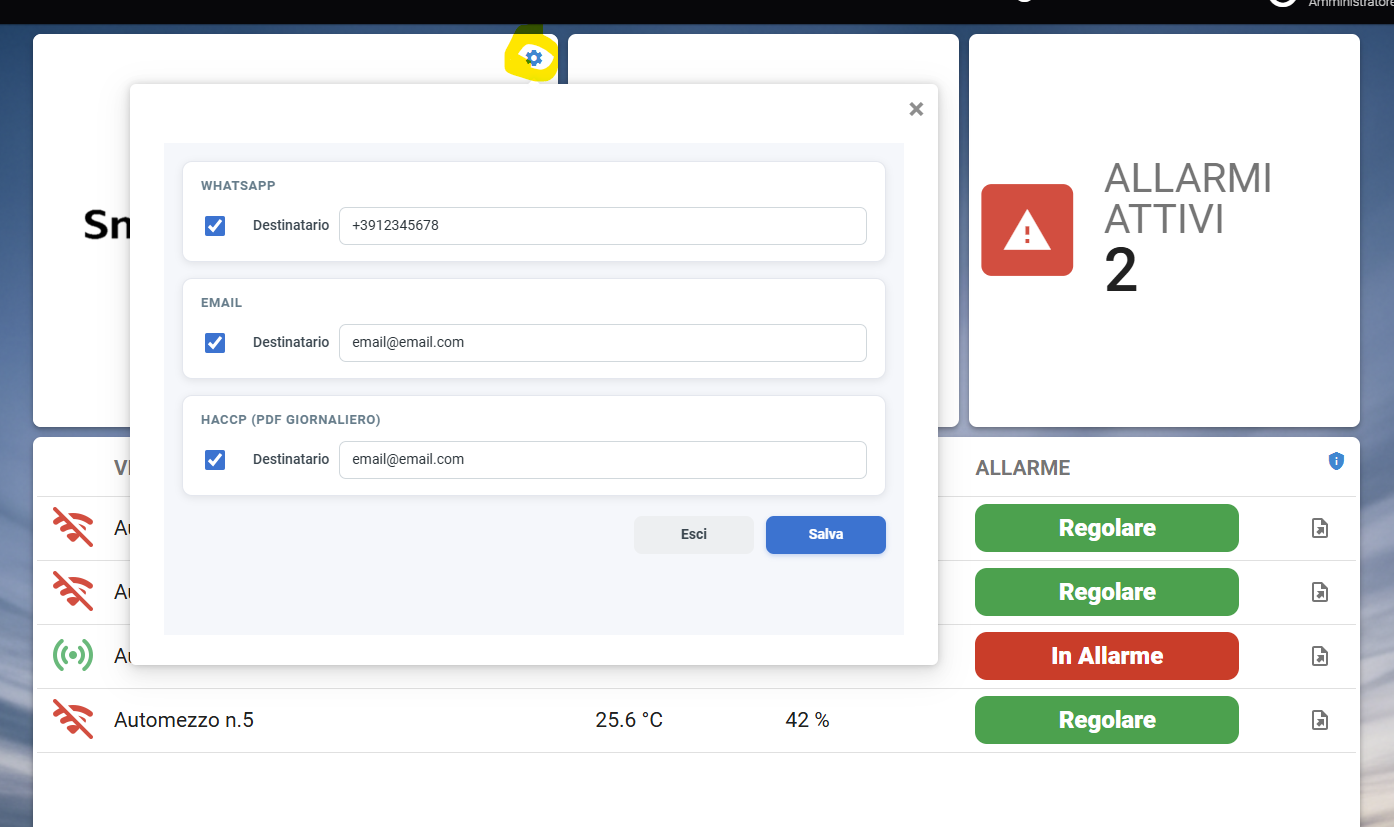
- From the dashboard, click on the gear icon at the top of the SmartCold Monitor box.
- The notifications configuration panel opens.
- In the 'WhatsApp' section, enable the 'Recipient' checkbox.
- Enter the telephone number complete with international prefix (e.g. +39348...).
- Click 'Save' to enable WhatsApp notifications.
Notes
WhatsApp notifications are sent only when a temperature alarm is triggered. Make sure the number entered is active on WhatsApp.
Troubleshooting
If you don't receive WhatsApp notifications, check that the number is correct and that your phone has WhatsApp installed and working.
Related guides
- How to configure temperature thresholds
Set the minimum and maximum thresholds for temperature alarms.
- How to activate email notifications
Receive temperature alarms via email.
- I am not receiving notifications WhatsApp
WhatsApp notifications do not arrive despite configuration.