How to disable automatic renewal
How to cancel the automatic renewal of your subscription.
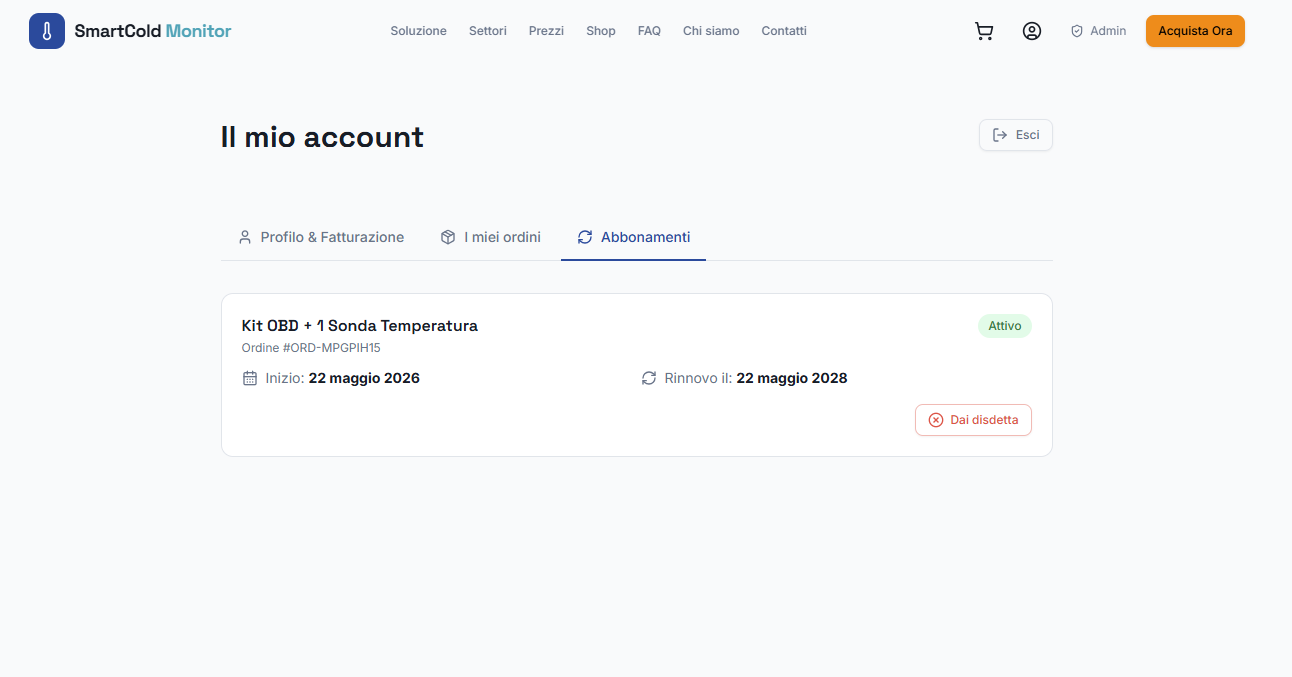
- Go to 'My Account' > 'Subscriptions'.
- On your active subscription card, click on 'Cancel'.
- A confirmation window opens with the message: 'Are you sure you want to cancel?'.
- Click 'Yes, unsubscribe' to confirm.
- Your subscription will remain active until its expiration date, but will not automatically renew.
- The subscription status will change from 'Active' to 'Cancelled' with a notice indicating the date until which the service can still be used.
Notes
Cancellation does not lead to immediate deactivation of the service. You will be able to continue using SmartCold Monitor until your subscription expires.
Troubleshooting
If the 'Cancel' button is not visible, your subscription may already be in a canceled or expired state. It is possible to cancel up to one month before the automatic renewal.
Related guides
- How to see your active subscription
Check the status of your SmartCold Monitor subscription.
- How to reactivate a subscription
Reactivate the automatic renewal of a previously canceled subscription.