How to reactivate a subscription
Reactivate the automatic renewal of a previously canceled subscription.
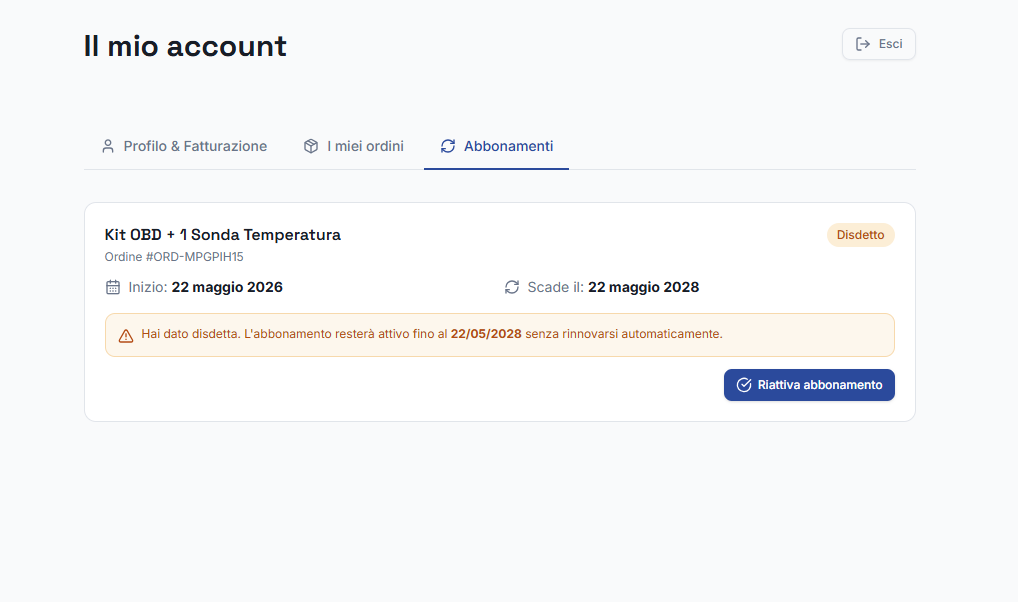
- Go to 'My Account' > 'Subscriptions'.
- If your subscription is in 'Cancelled' status, you will see the 'Reactivate Subscription' button.
- Click on 'Reactivate subscription'.
- A confirmation window opens: 'Are you sure you want to reactivate your subscription?'.
- Click 'Yes, reactivate' to confirm.
- Automatic renewal will reset to the original expiration date.
Notes
Reactivation is only possible if the subscription has not yet expired. After the expiry, you will need to make a new purchase.
Troubleshooting
If the reactivate button is not available, your subscription may have already expired. Contact support for assistance.
Related guides
- How to see your active subscription
Check the status of your SmartCold Monitor subscription.
- How to disable automatic renewal
How to cancel the automatic renewal of your subscription.