The vehicle is offline
What to do when a vehicle is not connected to the cloud.
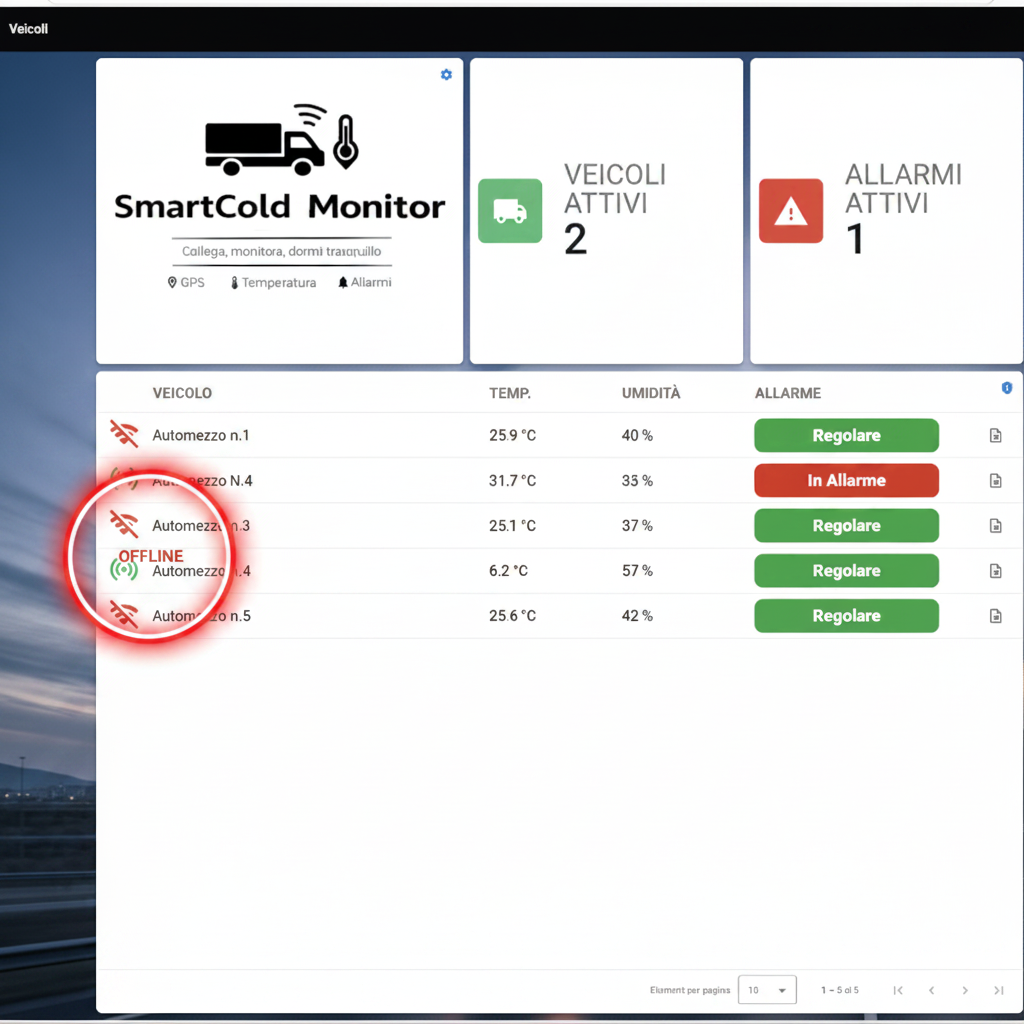
- Check that your vehicle's engine is running. The OBD device is powered by the vehicle socket and only works with the engine running.
- Check that the OBD device is inserted correctly into the diagnostic socket.
- Check that the vehicle is in an area with cellular network coverage.
- Try removing and reinserting the OBD device.
- Wait 5 minutes and check the cloud again. It may take a few minutes for your device to reconnect.
Notes
The vehicle is 'offline' when the OBD device has not transmitted data for more than 10 minutes. With the engine off for a few days, the offline status is normal.
Remember: the OBD device transmits data via mobile network (like a mobile phone), completely autonomously — it does not use the vehicle's Wi-Fi or other wireless systems. If the vehicle is in an area with little or no cellular coverage, the device may be temporarily offline even with the engine running.
Troubleshooting
If the vehicle remains offline with the engine running after 15 minutes, there may be a problem with the OBD device or the SIM. Contact support.
Related guides
- How to install device OBD
Step-by-step guide to connect the OBD device to the vehicle.
- How to check operation
Check that the OBD device and the probe are working correctly.